---
title: How to Access Your Wait List
description: How to Access the Wait List for Your Event
---
[Skip to content](https://zorts.zortssports.com/knowledge-base/how-to-access-the-wait-list-for-your-event#main-content)
English
Show submenu for translations

Open main navigation
Close main navigation
- English
Show submenu for translations
- [Help](https://zorts.zortssports.com/support_ticket)
[Help](https://zorts.zortssports.com/support_ticket?hsLang=en)
How can we help you?
- There are no suggestions because the search field is empty.
1. [Zorts Knowledge Base](https://zorts.zortssports.com/knowledge-base?hsLang=en)
2. [Event Administrators](https://zorts.zortssports.com/knowledge-base/event-administrators?hsLang=en)
# How to Access Your Wait List
## Below are step by step instructions on how to access the wait list for your event.
1. Navigate to https://zortssports.com and log into your account.
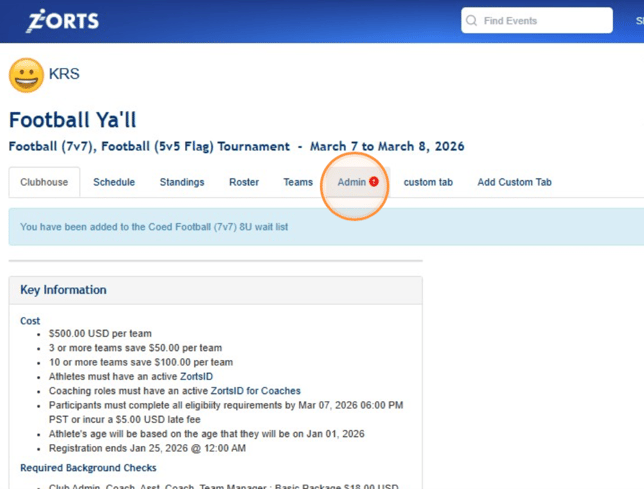
2. After selecting the event in question, click the **Admin** tab.
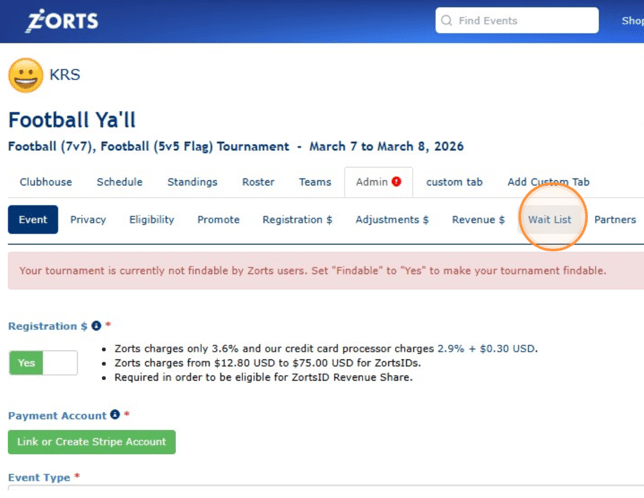
3. Click **Wait List**
****
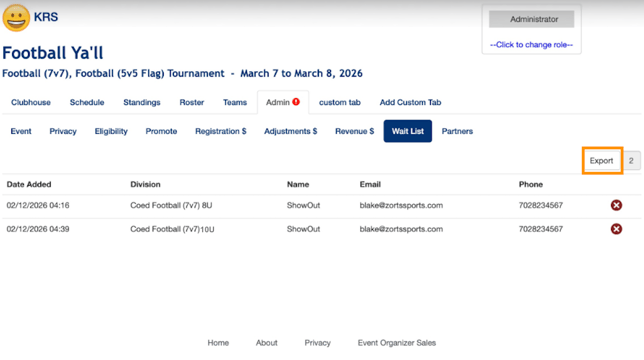
3\. Use the information listed to add teams to your event or click 'Export' to download the information to your computer.
> If you'd like to see how to add to the Wait List of your event, click [HERE](https://zorts.zortssports.com/knowledge-base/how-to-add-yourself-to-an-events-waitlist?hsLang=en).
- [Coaches](https://zorts.zortssports.com/knowledge-base/coaches?hsLang=en)
- [Participants](https://zorts.zortssports.com/knowledge-base/participants?hsLang=en)
- [Event Administrators](https://zorts.zortssports.com/knowledge-base/event-administrators?hsLang=en#main-content)
- [Payment Management](https://zorts.zortssports.com/knowledge-base/event-administrators?hsLang=en#payment-management)
- [Coaches and Event Administrators](https://zorts.zortssports.com/knowledge-base/coaches-and-event-administrators?hsLang=en)
- [STRIPE Training](https://zorts.zortssports.com/knowledge-base/stripe-training?hsLang=en)
[](http://zortssports.com)
Copyright © 2025, Zorts