---
title: How to Purchase a Background Check With Existing ZortsID For Coaches
description: How to Purchase a Background Check with Existing Zorts ID
---

[Skip to content](https://zorts.zortssports.com/knowledge-base/how-to-purchase-a-background-check-with-existing-zorts-coach-id#main-content)

English

Show submenu for translations

![](https://zorts.zortssports.com/hs-fs/hubfs/logo.png?width=120&height=120&name=logo.png)

Open main navigation

Close main navigation

- English
  
  Show submenu for translations
- [Help](https://zorts.zortssports.com/support_ticket)

[Help](https://zorts.zortssports.com/support_ticket?hsLang=en)

 How can we help you?

- There are no suggestions because the search field is empty.

1. [Zorts Knowledge Base](https://zorts.zortssports.com/knowledge-base?hsLang=en)
2. [Coaches](https://zorts.zortssports.com/knowledge-base/coaches?hsLang=en)

# How to Purchase a Background Check With Existing ZortsID For Coaches

## Below are step-by-step instructions for how to purchase a background check with your ZortsID.

> Background checks are performed by [Protect Youth Sports.](https://www.protectyouthsports.com/background-check-solutions-for-youth-sports/)

> Background Check fee is $18.00.

> Once background checks have been initiated a refund can not be processed for this service.

### Website

   1. Navigate to [https://zortssports.com](https://zortssports.com/) and log into your account.

   2. Click on your name in the top right corner.

![Screenshot 2025-05-19 095007](https://zorts.zortssports.com/hs-fs/hubfs/Screenshot%202025-05-19%20095007.png?width=670&height=78&name=Screenshot%202025-05-19%20095007.png)


    3. Select "**Your Account**".

![Screenshot 2025-05-19 095122](https://zorts.zortssports.com/hs-fs/hubfs/Screenshot%202025-05-19%20095122.png?width=670&height=121&name=Screenshot%202025-05-19%20095122.png)


    4. Click "**ZortsIDs**".

    5. Click "**ZortsIDs for Coaches**".

![](https://zorts.zortssports.com/hs-fs/hubfs/image-png-Sep-07-2026-03-30-09-0001-PM.png?width=601&height=194&name=image-png-Sep-07-2026-03-30-09-0001-PM.png)


    6. Click "**Actions**" under the Coach ZortsID. 

    7. Click "**Purchase Background Check**".

![](https://zorts.zortssports.com/hs-fs/hubfs/image-png-Sep-07-2026-03-33-09-9061-PM.png?width=491&height=544&name=image-png-Sep-07-2026-03-33-09-9061-PM.png)


    8. Enter your information and click "**Submit**".

**![](https://zorts.zortssports.com/hs-fs/hubfs/image-png-Sep-07-2026-03-36-20-6438-PM.png?width=670&height=229&name=image-png-Sep-07-2026-03-36-20-6438-PM.png)**


9\. Enter your name to consent to the agreement and click 'Submit'

![](https://zorts.zortssports.com/hs-fs/hubfs/image-png-Sep-07-2026-03-37-29-3585-PM.png?width=670&height=473&name=image-png-Sep-07-2026-03-37-29-3585-PM.png)


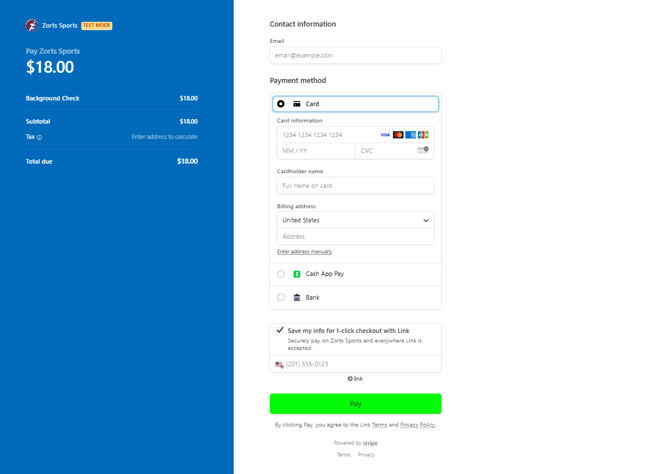
    10. Enter your contact and payment information then click 'Pay'
![Screenshot 2025-05-19 101744](https://zorts.zortssports.com/hs-fs/hubfs/Screenshot%202025-05-19%20101744.png?width=670&height=474&name=Screenshot%202025-05-19%20101744.png)


    11. Your background check is now "Ordered" and will typically be completed within 3-5 business days.


### iPhone

    1. After logging into your account, click 'Account' at the bottom right of your screen, and then click 'Zorts Cards'

![](https://zorts.zortssports.com/hs-fs/hubfs/image-png-Sep-07-2026-03-38-21-7431-PM.png?width=190&height=413&name=image-png-Sep-07-2026-03-38-21-7431-PM.png)


    2. Click ''**Coach ZortsIDs**" then select your Coach ZortsID.  
    3. Click "**complete background check**".

![](https://zorts.zortssports.com/hs-fs/hubfs/image-png-Sep-07-2026-03-50-02-0369-PM.png?width=190&height=413&name=image-png-Sep-07-2026-03-50-02-0369-PM.png)   ![](https://zorts.zortssports.com/hs-fs/hubfs/image-png-Sep-07-2026-03-51-28-3733-PM.png?width=190&height=413&name=image-png-Sep-07-2026-03-51-28-3733-PM.png)


    4. Enter your information and click "**Submit**".  
    5. Enter your name to consent to the agreement and click "**Submit**".

![](https://zorts.zortssports.com/hs-fs/hubfs/image-png-Sep-07-2026-04-00-22-2118-PM.png?width=190&height=413&name=image-png-Sep-07-2026-04-00-22-2118-PM.png)   ![](https://zorts.zortssports.com/hs-fs/hubfs/image-png-Sep-07-2026-04-00-42-3299-PM.png?width=190&height=413&name=image-png-Sep-07-2026-04-00-42-3299-PM.png)


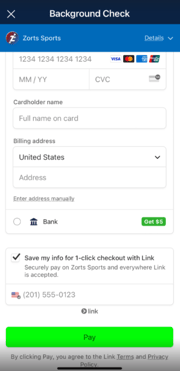
    6. Enter your contact and payment information then click 'Pay'

![Screenshot 2025-05-19 133928](https://zorts.zortssports.com/hs-fs/hubfs/Screenshot%202025-05-19%20133928.png?width=180&height=371&name=Screenshot%202025-05-19%20133928.png)


    7. Your background check is now "Ordered" and will typically be completed within 3-5 business days.


### Android

    1. After logging into your account, click "**Settings**" at the top right of your screen, and then click "**ZortsIDs**".

![](https://zorts.zortssports.com/hs-fs/hubfs/image-png-Sep-07-2026-03-43-57-2756-PM.png?width=190&height=412&name=image-png-Sep-07-2026-03-43-57-2756-PM.png)    ![](https://zorts.zortssports.com/hs-fs/hubfs/image-png-Sep-07-2026-03-44-15-7298-PM.png?width=190&height=412&name=image-png-Sep-07-2026-03-44-15-7298-PM.png)


    2. Click the Coach ZortsID then Click "**Background Check**".

![](https://zorts.zortssports.com/hs-fs/hubfs/image-png-Sep-07-2026-04-00-59-9862-PM.png?width=190&height=412&name=image-png-Sep-07-2026-04-00-59-9862-PM.png)


    3. Enter your information and click "**Submit**".  
    4. Enter your name to consent to the agreement and click "**Submit**".

![](https://zorts.zortssports.com/hs-fs/hubfs/image-png-Sep-07-2026-04-01-18-3010-PM.png?width=190&height=412&name=image-png-Sep-07-2026-04-01-18-3010-PM.png)   ![](https://zorts.zortssports.com/hs-fs/hubfs/image-png-Sep-07-2026-04-02-13-0705-PM.png?width=190&height=412&name=image-png-Sep-07-2026-04-02-13-0705-PM.png)


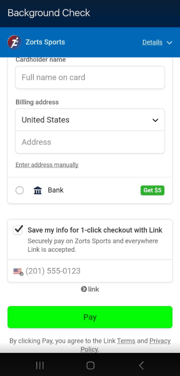
    5. Enter your contact and payment information then click "**Pay**".
![Screenshot 2025-05-19 160501](https://zorts.zortssports.com/hs-fs/hubfs/Screenshot%202025-05-19%20160501.png?width=180&height=377&name=Screenshot%202025-05-19%20160501.png)


    6. Your background check is now "Ordered" and will typically be completed within 3-5 business days.


- [Coaches](https://zorts.zortssports.com/knowledge-base/coaches?hsLang=en)
- [Participants](https://zorts.zortssports.com/knowledge-base/participants?hsLang=en)
- [Event Administrators](https://zorts.zortssports.com/knowledge-base/event-administrators?hsLang=en#main-content)

    - [Payment Management](https://zorts.zortssports.com/knowledge-base/event-administrators?hsLang=en#payment-management)
- [Coaches and Event Administrators](https://zorts.zortssports.com/knowledge-base/coaches-and-event-administrators?hsLang=en)
- [STRIPE Training](https://zorts.zortssports.com/knowledge-base/stripe-training?hsLang=en)

[![](https://zorts.zortssports.com/hs-fs/hubfs/logo.png?width=120&height=120&name=logo.png)](http://zortssports.com)

<https://www.facebook.com/zortssportsapp/> <https://twitter.com/ZortsSports> <https://www.instagram.com/zorts_sports/> <https://www.youtube.com/channel/UCkYuWAwd89ZtlW_CkkjR1lA>

Copyright © 2025, Zorts