---
title: How to Renew Your ZortsID
description: How to Renew an Expired Zorts Card
---

[Skip to content](https://zorts.zortssports.com/knowledge-base/how-to-renew-an-expired-zorts-card#main-content)

English

Show submenu for translations

![](https://zorts.zortssports.com/hs-fs/hubfs/logo.png?width=120&height=120&name=logo.png)

Open main navigation

Close main navigation

- English
  
  Show submenu for translations
- [Help](https://zorts.zortssports.com/support_ticket)

[Help](https://zorts.zortssports.com/support_ticket?hsLang=en)

 How can we help you?

- There are no suggestions because the search field is empty.

1. [Zorts Knowledge Base](https://zorts.zortssports.com/knowledge-base?hsLang=en)
2. [Participants](https://zorts.zortssports.com/knowledge-base/participants?hsLang=en)

# How to Renew Your ZortsID

## Below are step by step instructions on how to renew your ZortsID using the web, iPhone app, or Android app.

### Table of Contents:

- [Website](https://zorts.zortssports.com/knowledge-base/how-to-renew-an-expired-zorts-card#web)
- [iPhone App](https://zorts.zortssports.com/knowledge-base/how-to-renew-an-expired-zorts-card#iPhone)
- [Android App](https://zorts.zortssports.com/knowledge-base/how-to-renew-an-expired-zorts-card#Android)


### Website

      1. Navigate to [https://zortssports.com](https://zortssports.com/) and log into your account.

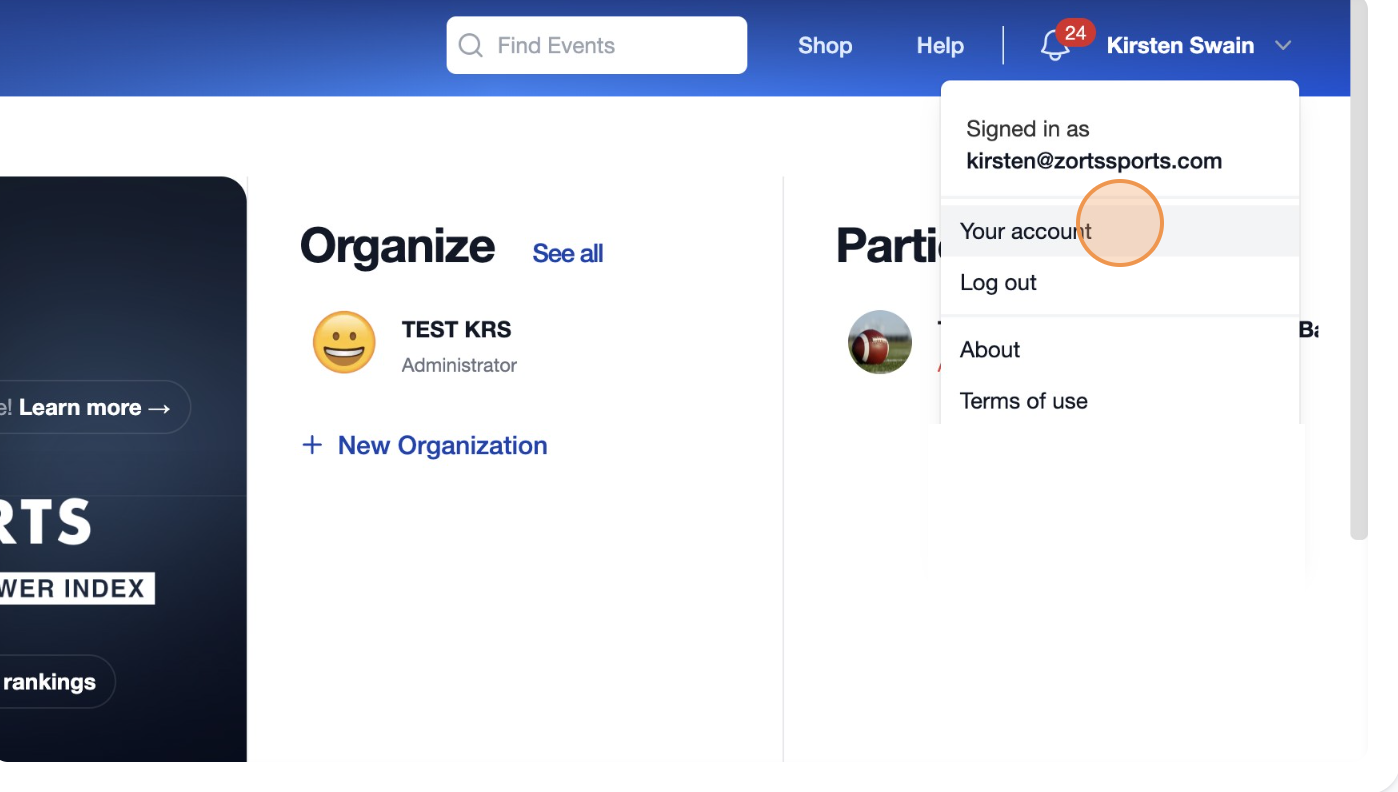
      2. Click on your name in the top right corner


![](https://desk.zoho.com/galleryDocuments/edbsn5b65061f5314e704f4502dc891ef6c89137bce8f4bcde474dae6e9007f12c73d8fe64d06da859cf7972cf109c5ae21a1?inline=true)


      3. Select "**Your Account**".


![](https://desk.zoho.com/galleryDocuments/edbsnc93647d39a1b4f22d524f4c9230e48fc62b3f76177f30a1b2ef35e82958700cdb1d9e9dbb1daef9d3001af0f78158e92?inline=true)


    4. Click "**ZortsIDs**".

![](https://lh7-rt.googleusercontent.com/docsz/AD_4nXcJFQpNB4MHEEvxbnf1vjTThoiiQChYPgHOkqY3-Btd69r2jtyn4leQV7B0MwCQc8McttjL16mUbldjm1SBxIG9yChJr5jMzi_R8j1mnkS0BuOFoYZKABWYzUhpfd0Wnwhqt8NSbg?key=gSg-M26tkzBqjyiG2Jn5Mw)


    5. Click "**Actions**".


![](https://zorts.zortssports.com/hs-fs/hubfs/image-png-Sep-01-2026-06-29-36-3248-PM.png?width=478&height=602&name=image-png-Sep-01-2026-06-29-36-3248-PM.png)

    6. Click "**Renew**".

![](https://zorts.zortssports.com/hs-fs/hubfs/image-png-Sep-01-2026-06-30-23-2152-PM.png?width=478&height=602&name=image-png-Sep-01-2026-06-30-23-2152-PM.png)


    7. Select the card type, then click "**Next**".


![](https://zorts.zortssports.com/hs-fs/hubfs/image-png-Sep-01-2026-06-30-54-6658-PM.png?width=670&height=379&name=image-png-Sep-01-2026-06-30-54-6658-PM.png)  


     8. CAREFULLY review the specifications to the left, then click to upload a current headshot  photo of your athlete.

![](https://lh7-rt.googleusercontent.com/docsz/AD_4nXdl_aBdS9fvtjekC2cYbNMTg2sqm0p7z8qVKInPK-CDAFYxwIW-G6ZOntDWiVD1ZywE0hsMEdNWlVgCvrzMYhKEp142pcnnY3vXqHRJ6NBSfYwDafj0xKfdGZQi0JmoFqfQLXb-nQ?key=gSg-M26tkzBqjyiG2Jn5Mw)

    9. Once you’ve selected your photo, please zoom in to crop (if necessary) and position the face in the center of the frame. Then, click "**Save**".

![](https://zorts.zortssports.com/hs-fs/hubfs/image-png-Sep-01-2026-06-31-33-3982-PM.png?width=624&height=372&name=image-png-Sep-01-2026-06-31-33-3982-PM.png)  
     

    10. Click "**Next**".

![](https://zorts.zortssports.com/hs-fs/hubfs/image-png-Sep-01-2026-06-31-59-9447-PM.png?width=624&height=372&name=image-png-Sep-01-2026-06-31-59-9447-PM.png)


    11. Select a **Document Type**.


 ![](https://lh7-rt.googleusercontent.com/docsz/AD_4nXe4Hbcn_OWLamsDfLS38g09NpDXjUq2mSHaDzCG_smsDzFLO1j2WP5HTNjSLgc5MLf6srW0D0-EOW6Uvq5u0KyQAUD2oK4tqQMgTgIffriQfcNpj7fyrwQgw4VuY1NJgeuLK2-K1Q?key=gSg-M26tkzBqjyiG2Jn5Mw)


     12. Click inside the square to the right to upload your document, then click "**Next**".

![](https://lh7-rt.googleusercontent.com/docsz/AD_4nXdFT1iFawX82T13HsYK3YEkfkeTW19grdNT1bX9eit9xmaxYDyBaFMBOX3EZCWelYVJmcwO6Iv4JV-NDJ-fLRU17StnnVeJLGvxE4P-F-50JYzZRXhaTslXSQoWr-R7FhFrzmQFwg?key=gSg-M26tkzBqjyiG2Jn5Mw)


     13. Review your information.

![](https://zorts.zortssports.com/hs-fs/hubfs/image-png-Sep-01-2026-06-33-09-3164-PM.png?width=624&height=372&name=image-png-Sep-01-2026-06-33-09-3164-PM.png)


    14. Review the Biometric Data Disclosure and Consent form. 


![](https://zorts.zortssports.com/hs-fs/hubfs/image-png-Sep-01-2026-06-33-44-8353-PM.png?width=624&height=372&name=image-png-Sep-01-2026-06-33-44-8353-PM.png)  


     15. Provide your consent by entering your name and checking the box.

        a. Click "**Next**".

![](https://zorts.zortssports.com/hs-fs/hubfs/image-png-Sep-01-2026-06-34-48-2875-PM.png?width=624&height=372&name=image-png-Sep-01-2026-06-34-48-2875-PM.png)

    16. Select your desired processing speed

![](https://lh7-rt.googleusercontent.com/docsz/AD_4nXfPv0XyZjqDtDVSNkdi7kXynCwFlNqjXBGh4I0jQoFTxrI386tMt9qG6Fyrk969bXXlQ9zj6HN5Mxu0NX6LFiazLwxzxzMPHA_grcAbFuDTTfKsBagJH8IjeNcZlsFvqoTAdLAOKw?key=gSg-M26tkzBqjyiG2Jn5Mw)

    17. Click "**Checkout**".


 ![](https://lh7-rt.googleusercontent.com/docsz/AD_4nXeUwZumFKmezSGUaJyrN7oo8UopAQdrVF5143BG9S9n-eC5IqaFdgSZhp6g1ZTpsrbF2Qi9W7Z-VmaSvo1Dzr1GokTWEBrDQKnbkD_WkMSnfoyPiBGQ2KAaELjyN0gbw-LzNkpWeQ?key=gSg-M26tkzBqjyiG2Jn5Mw)


     18. Enter your payment information and click "**Pay**" to complete the renewal and submit your ZortsID for review.


### iPhone App

      1. After logging into your account, click 'Account' at the bottom right of your screen, and then click "**ZortsIDs**".

      2. Click on your expired ZortsID.

      3. Click "**Renew**".


![](https://zorts.zortssports.com/hs-fs/hubfs/image-png-Sep-04-2026-08-39-37-1596-PM.png?width=190&height=413&name=image-png-Sep-04-2026-08-39-37-1596-PM.png)   ![](https://zorts.zortssports.com/hs-fs/hubfs/image-png-Sep-04-2026-08-39-58-4061-PM.png?width=190&height=413&name=image-png-Sep-04-2026-08-39-58-4061-PM.png)   ![](https://zorts.zortssports.com/hs-fs/hubfs/image-png-Sep-04-2026-08-40-10-5500-PM.png?width=190&height=413&name=image-png-Sep-04-2026-08-40-10-5500-PM.png)  


      4. Select the card type, then click "**Next**".


![](https://zorts.zortssports.com/hs-fs/hubfs/image-png-Sep-04-2026-08-40-24-7102-PM.png?width=190&height=413&name=image-png-Sep-04-2026-08-40-24-7102-PM.png)  


      5. CAREFULLY review the guidelines listed, then click to upload a current headshot photo of your athlete.  
      6. Once you’ve selected your photo, please zoom in to crop (if necessary) and position the face in the center of the frame. Then, click "**Save**".   
      7. Click "**Next**".

![](https://zorts.zortssports.com/hs-fs/hubfs/image-png-Sep-04-2026-08-40-42-8563-PM.png?width=190&height=413&name=image-png-Sep-04-2026-08-40-42-8563-PM.png)   ![](https://zorts.zortssports.com/hs-fs/hubfs/image-png-Sep-04-2026-08-40-58-2836-PM.png?width=190&height=413&name=image-png-Sep-04-2026-08-40-58-2836-PM.png)   ![](https://zorts.zortssports.com/hs-fs/hubfs/image-png-Sep-04-2026-08-41-13-0959-PM.png?width=190&height=413&name=image-png-Sep-04-2026-08-41-13-0959-PM.png)

      8. Select a **Document Type**.  
      9. CAREFULLY review the specifications listed, click to upload your document, then click "**Next**".

![](https://zorts.zortssports.com/hs-fs/hubfs/image-png-Sep-04-2026-08-41-27-5377-PM.png?width=190&height=413&name=image-png-Sep-04-2026-08-41-27-5377-PM.png)   ![](https://zorts.zortssports.com/hs-fs/hubfs/image-png-Sep-04-2026-08-41-44-3676-PM.png?width=190&height=413&name=image-png-Sep-04-2026-08-41-44-3676-PM.png)  

    10. Review your information.

    11. Scroll down and review the Biometric Data Disclosure and Consentform.

![](https://zorts.zortssports.com/hs-fs/hubfs/image-png-Sep-04-2026-08-42-31-1166-PM.png?width=190&height=413&name=image-png-Sep-04-2026-08-42-31-1166-PM.png)   ![](https://zorts.zortssports.com/hs-fs/hubfs/image-png-Sep-04-2026-08-42-52-2654-PM.png?width=190&height=413&name=image-png-Sep-04-2026-08-42-52-2654-PM.png)


    12. Enter your full name, check the box to agree to the terms, and click "**Next**".

    13. Choose your processing speed and click "**Checkout**" to enter your payment information and complete purchase.


 ![](https://zorts.zortssports.com/hs-fs/hubfs/image-png-Sep-04-2026-08-43-52-7166-PM.png?width=190&height=413&name=image-png-Sep-04-2026-08-43-52-7166-PM.png)   ![](https://zorts.zortssports.com/hs-fs/hubfs/image-png-Sep-04-2026-08-44-07-3130-PM.png?width=190&height=413&name=image-png-Sep-04-2026-08-44-07-3130-PM.png)


### Android App

    1. After logging into your account, from the **Home** tab on the bottom of the screen, click "**Settings**" on the top right.

    2. Click "**ZortsIDs**".

    3. Click on the ZortsID in question and select "**Renew**" from the drop down menu.


![](https://zorts.zortssports.com/hs-fs/hubfs/image-png-Sep-04-2026-08-08-21-4927-PM.png?width=190&height=412&name=image-png-Sep-04-2026-08-08-21-4927-PM.png)   ![](https://zorts.zortssports.com/hs-fs/hubfs/image-png-Sep-04-2026-08-08-40-2200-PM.png?width=190&height=412&name=image-png-Sep-04-2026-08-08-40-2200-PM.png)  ![](https://zorts.zortssports.com/hs-fs/hubfs/image-png-Sep-04-2026-08-08-59-8402-PM.png?width=190&height=412&name=image-png-Sep-04-2026-08-08-59-8402-PM.png)  


    4. Select the type of ZortsID you are renewing.

        a. Click "**Next**". 


![](https://zorts.zortssports.com/hs-fs/hubfs/image-png-Sep-04-2026-08-11-02-1259-PM.png?width=190&height=412&name=image-png-Sep-04-2026-08-11-02-1259-PM.png)


      5. CAREFULLY review the guidelines listed, then click to upload a ‘Current Headshot’ photo of your athlete.  
      6. Once you’ve selected your photo, please zoom in to crop (if necessary) and position the face in the center of the frame. Then, click "**save**".   
      7. Click "**Next**".


![](https://zorts.zortssports.com/hs-fs/hubfs/image-png-Sep-04-2026-08-12-54-8000-PM.png?width=190&height=412&name=image-png-Sep-04-2026-08-12-54-8000-PM.png)   ![](https://zorts.zortssports.com/hs-fs/hubfs/image-png-Sep-04-2026-08-14-15-0689-PM.png?width=190&height=412&name=image-png-Sep-04-2026-08-14-15-0689-PM.png)   ![](https://zorts.zortssports.com/hs-fs/hubfs/image-png-Sep-04-2026-08-14-26-1890-PM.png?width=190&height=412&name=image-png-Sep-04-2026-08-14-26-1890-PM.png)


      8. Select a **Document Type.**  
      9. CAREFULLY review the specifications listed, click to upload your document, then click "**Next**".


![](https://zorts.zortssports.com/hs-fs/hubfs/image-png-Sep-04-2026-08-15-28-2430-PM.png?width=190&height=412&name=image-png-Sep-04-2026-08-15-28-2430-PM.png)   ![](https://zorts.zortssports.com/hs-fs/hubfs/image-png-Sep-04-2026-08-15-39-4028-PM.png?width=190&height=412&name=image-png-Sep-04-2026-08-15-39-4028-PM.png)


    10. Review your information

    11. Scroll down and review the Biometric Data Disclosure and Consentform


![](https://zorts.zortssports.com/hs-fs/hubfs/image-png-Sep-04-2026-08-18-12-8943-PM.png?width=190&height=412&name=image-png-Sep-04-2026-08-18-12-8943-PM.png)   ![](https://zorts.zortssports.com/hs-fs/hubfs/image-png-Sep-04-2026-08-18-24-7827-PM.png?width=190&height=412&name=image-png-Sep-04-2026-08-18-24-7827-PM.png)


    12. Enter your full name, check the box to agree to the terms, and click "**Next**".

    13. Choose your processing speed and click "**Checkout**" to enter your payment information and complete purchase.


![](https://zorts.zortssports.com/hs-fs/hubfs/image-png-Sep-04-2026-08-18-45-1138-PM.png?width=190&height=412&name=image-png-Sep-04-2026-08-18-45-1138-PM.png)   ![](https://zorts.zortssports.com/hs-fs/hubfs/image-png-Sep-04-2026-08-18-55-3003-PM.png?width=190&height=412&name=image-png-Sep-04-2026-08-18-55-3003-PM.png)


- [Coaches](https://zorts.zortssports.com/knowledge-base/coaches?hsLang=en)
- [Participants](https://zorts.zortssports.com/knowledge-base/participants?hsLang=en)
- [Event Administrators](https://zorts.zortssports.com/knowledge-base/event-administrators?hsLang=en#main-content)

    - [Payment Management](https://zorts.zortssports.com/knowledge-base/event-administrators?hsLang=en#payment-management)
- [Coaches and Event Administrators](https://zorts.zortssports.com/knowledge-base/coaches-and-event-administrators?hsLang=en)
- [STRIPE Training](https://zorts.zortssports.com/knowledge-base/stripe-training?hsLang=en)

[![](https://zorts.zortssports.com/hs-fs/hubfs/logo.png?width=120&height=120&name=logo.png)](http://zortssports.com)

<https://www.facebook.com/zortssportsapp/> <https://twitter.com/ZortsSports> <https://www.instagram.com/zorts_sports/> <https://www.youtube.com/channel/UCkYuWAwd89ZtlW_CkkjR1lA>

Copyright © 2025, Zorts