---
title: How to Share or Transfer ZortsIDs
description: How to Share/Transfer a Zorts Card
---

[Skip to content](https://zorts.zortssports.com/knowledge-base/sharing-zorts-cards#main-content)

English

Show submenu for translations

![](https://zorts.zortssports.com/hs-fs/hubfs/logo.png?width=120&height=120&name=logo.png)

Open main navigation

Close main navigation

- English
  
  Show submenu for translations
- [Help](https://zorts.zortssports.com/support_ticket)

[Help](https://zorts.zortssports.com/support_ticket?hsLang=en)

 How can we help you?

- There are no suggestions because the search field is empty.

1. [Zorts Knowledge Base](https://zorts.zortssports.com/knowledge-base?hsLang=en)
2. [Participants](https://zorts.zortssports.com/knowledge-base/participants?hsLang=en)

# How to Share or Transfer ZortsIDs

## Below are step-by-step instructions on how to share or transfer your ZortsID with another user's account using the web, iPhone app, and Android app.

### Web

    1. After logging into your account, click on your name in the upper right hand corner and select 'Your Account'.  



![](https://desk.zoho.com/galleryDocuments/edbsna78d8d1c119ef60ea68e1f1e67818fdc673e748b1d779451039deaa3a510b3a608b13be718edd534ab061ec4d36cb5eb?inline=true)


    2. Click on the Zorts Cards tab to see all of your Zorts Player/Participant and/or Coach Cards. 


![](https://zorts.zortssports.com/hs-fs/hubfs/image-png-Sep-06-2026-01-43-24-2736-AM.png?width=670&height=251&name=image-png-Sep-06-2026-01-43-24-2736-AM.png)


    3. Click the 'Share' button, from the "**Actions**" dropdown, underneath the ZortsID that you would like to share with another account. 


![](https://zorts.zortssports.com/hs-fs/hubfs/image-png-Sep-06-2026-01-50-04-9978-AM.png?width=670&height=737&name=image-png-Sep-06-2026-01-50-04-9978-AM.png)


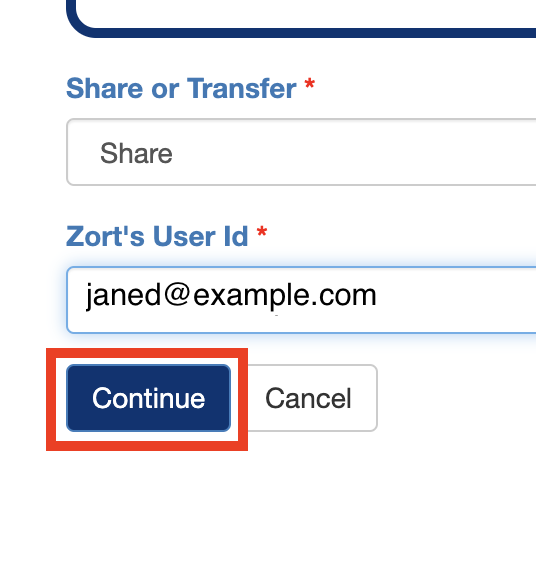
    4. Select "**Share**" or "**Transfer**" from the first drop-down.

    5. Enter the Zorts Account User ID of the account holder you wish to share access with.

    6. Click "**Continue**".


![](https://desk.zoho.com/galleryDocuments/edbsn2f4bf9d0b19d99110c77fe2e0f60141d32efee676a08b1b0479171180e08343ae775a07a326759dd1a4ed4c1ebc16d8c?inline=true)


    7. Review the information and click 'Share'



![](https://desk.zoho.com/galleryDocuments/edbsn7d7cec07f5117ecfa874839226308f29cb9982c6a3bd3638dfbdd76d77137a55b013b3b84de9d3273c1dfa638bdb1e1a?inline=true)


### iPhone App

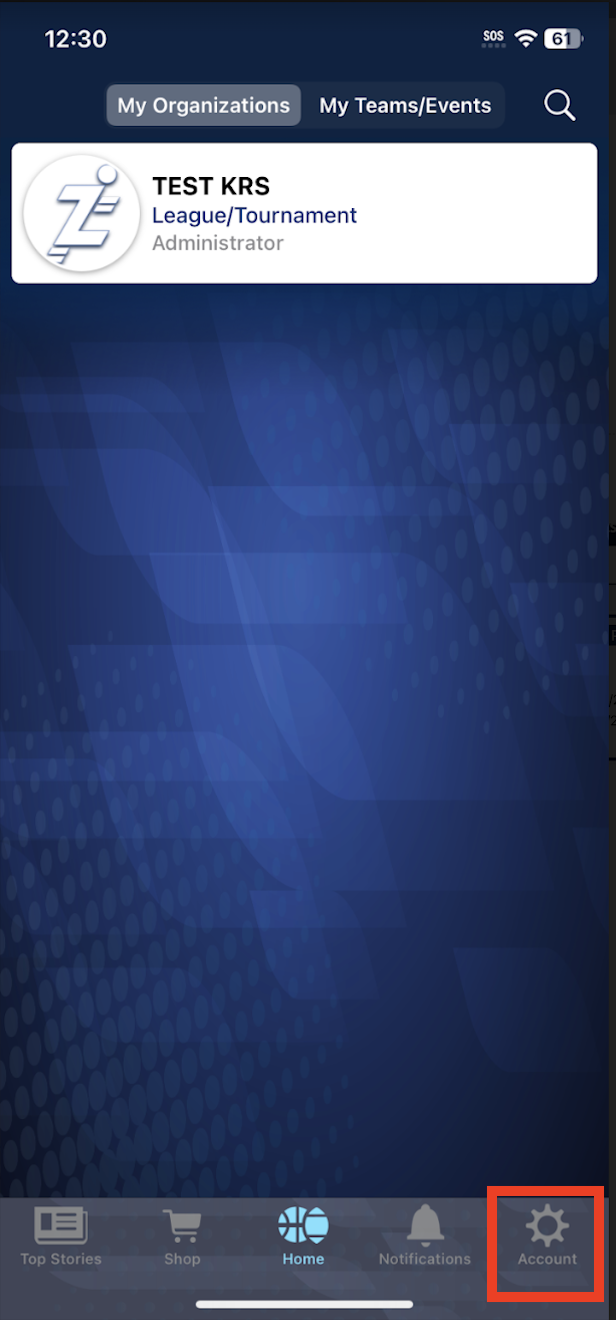
    1. From your account, click "**Account**" on the bottom right-hand side of the screen.

    2. Click "**ZortsIDs**".

    3. Select the ZortsID that you would like to share.
 

![](https://desk.zoho.com/galleryDocuments/edbsn2a875a8adf3e79f832083e48fdae240c6e1b81d4ddc7f7744c91df40e3fd0996280a07df4ede0e052b9fc3e8c1eccf22?inline=true)   ![](https://zorts.zortssports.com/hs-fs/hubfs/image-png-Sep-07-2026-03-03-31-8720-PM.png?width=190&height=413&name=image-png-Sep-07-2026-03-03-31-8720-PM.png)  ![](https://zorts.zortssports.com/hs-fs/hubfs/image-png-Sep-07-2026-03-03-51-9945-PM.png?width=190&height=413&name=image-png-Sep-07-2026-03-03-51-9945-PM.png)  


      4. Click "**Share/Transfer Ownership**"

      5. Enter the user ID belonging to the person you would like to share or transfer to

            a. Click either "**Share Ownership"** or "**Transfer Ownership"**

      6. Confirm your selection


![](https://zorts.zortssports.com/hs-fs/hubfs/image-png-Sep-07-2026-03-04-33-9439-PM.png?width=190&height=413&name=image-png-Sep-07-2026-03-04-33-9439-PM.png)   ![](https://zorts.zortssports.com/hs-fs/hubfs/image-png-Sep-07-2026-03-04-50-4845-PM.png?width=190&height=413&name=image-png-Sep-07-2026-03-04-50-4845-PM.png)   ![](https://zorts.zortssports.com/hs-fs/hubfs/image-png-Sep-07-2026-03-05-05-3386-PM.png?width=190&height=413&name=image-png-Sep-07-2026-03-05-05-3386-PM.png)  


### Android

      1. From your account on your Android app, click 'Settings' in the upper right hand corner of the screen. 

      2. Click "**ZortsIDs**".


![](https://zorts.zortssports.com/hs-fs/hubfs/image-png-Sep-07-2026-03-21-43-8646-PM.png?width=190&height=412&name=image-png-Sep-07-2026-03-21-43-8646-PM.png)   ![](https://zorts.zortssports.com/hs-fs/hubfs/image-png-Sep-07-2026-03-21-59-8723-PM.png?width=190&height=412&name=image-png-Sep-07-2026-03-21-59-8723-PM.png)  


      3. Click on the ZortsID that you would like to share or transfer to another account. 

            a. Select "**Share/Transfer**". 


![](https://zorts.zortssports.com/hs-fs/hubfs/image-png-Sep-07-2026-03-24-58-7063-PM.png?width=190&height=412&name=image-png-Sep-07-2026-03-24-58-7063-PM.png)  


      4. Select "**Share**" or "**Transfer**" from the drop-down menu

            a. Enter the user ID belonging to the account you would like to share or transfer to. 

      6. Click "**Continue**". 


![](https://zorts.zortssports.com/hs-fs/hubfs/image-png-Sep-07-2026-03-25-36-6413-PM.png?width=190&height=412&name=image-png-Sep-07-2026-03-25-36-6413-PM.png)   ![](https://zorts.zortssports.com/hs-fs/hubfs/image-png-Sep-07-2026-03-25-47-1486-PM.png?width=190&height=412&name=image-png-Sep-07-2026-03-25-47-1486-PM.png)

- [Coaches](https://zorts.zortssports.com/knowledge-base/coaches?hsLang=en)
- [Participants](https://zorts.zortssports.com/knowledge-base/participants?hsLang=en)
- [Event Administrators](https://zorts.zortssports.com/knowledge-base/event-administrators?hsLang=en#main-content)

    - [Payment Management](https://zorts.zortssports.com/knowledge-base/event-administrators?hsLang=en#payment-management)
- [Coaches and Event Administrators](https://zorts.zortssports.com/knowledge-base/coaches-and-event-administrators?hsLang=en)
- [STRIPE Training](https://zorts.zortssports.com/knowledge-base/stripe-training?hsLang=en)

[![](https://zorts.zortssports.com/hs-fs/hubfs/logo.png?width=120&height=120&name=logo.png)](http://zortssports.com)

<https://www.facebook.com/zortssportsapp/> <https://twitter.com/ZortsSports> <https://www.instagram.com/zorts_sports/> <https://www.youtube.com/channel/UCkYuWAwd89ZtlW_CkkjR1lA>

Copyright © 2025, Zorts