
Club Admin Role
The person who registers the organization, whether they are a coach, assistant, team manager, etc., automatically receives the club admin role. The role is assigned for the division(s) that are registered.
If the event administrator manually adds a team (they did not sign themselves up) they may choose who to appoint Club Admin, or not appoint anyone.
If the payment was made outside of Zorts, please contact the event administrator to send you the club admin sign up link or add you manually.
--If the event administrator adds a coach/club admin manually, check your notifications to accept the request.
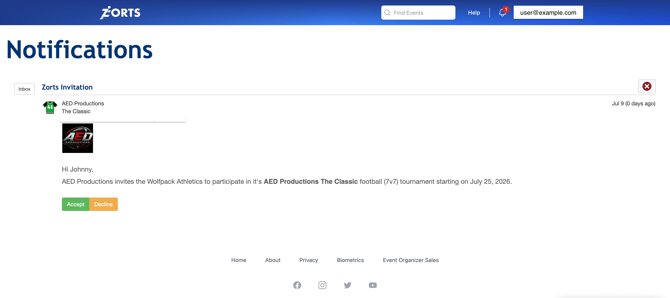
To learn about accepting invite links, click here.
--Each division/team can be managed from your 'Club Admin' role by filtering the division/team you would like to view individually.
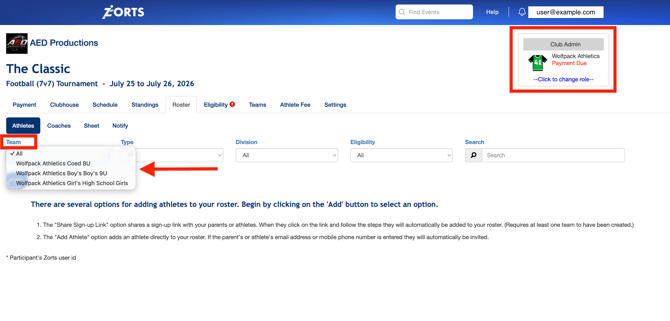
You can manage your participants all together by not selecting a filter, or you may choose a specific team and manage them individually.
Coach Role
The person/people assigned as Coach, Assistant Coach, or Team Manager all have the same access to their assigned team/participants as the club admin. The difference here is that, the club admin has access to ALL teams/participants in the "club", while the coach/asst coach/team manager ONLY has access to the teams/participants that they are assigned to.
The differentiation here is mainly for internal organization only.
There can be as many coaches/asst coaches/team managers as you'd like. However, only a certain number may be allowed access at the event. The number of coaches allowed access is set by the event administrator.
To learn how to assign field access, click here.